Skip to content
Notes by Axbom
Per Axbom Bluesky

You can personalise the tabs/feeds you want at the top. You can even remove/rearrange them.

There are feeds for
- Mutuals (you follow each other)
- Popular with friends (popular from your follows and what they like)
- Specific languages
– News

and many more!

See Feeds in the menu.
#QuickTutorial
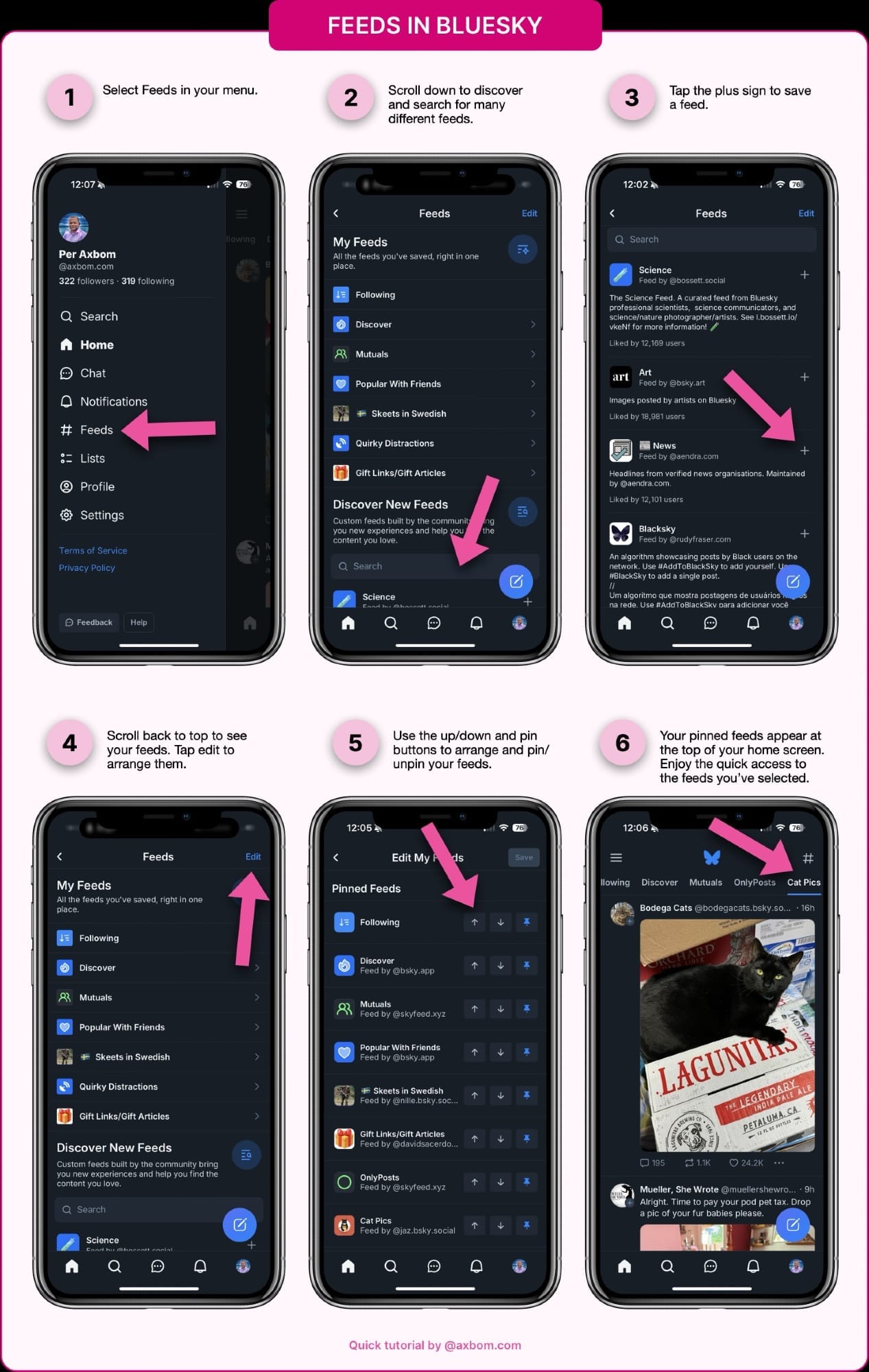
A step-by-step tutorial for managing feeds in Bluesky, with screenshots for each step.

1. Select Feeds in your menu (it’s the fifth menu item in the screenshot).

2. Scroll down to discover and search for many different feeds. The title for this sections is “Discover new feeds”.

3. Tap the plus sign to save a feed. Each feed item has a circular plus button to the far right of its title.

4. Scroll back to top to see your feeds. Tap edit to arrange them. This is still the same screen, the edit button is at the very top right.

5. Use the up/down and pin buttons to arrange and pin/unpin your feeds. Each feed item has three button to the right, in this order: move up, move down and a pin/unpin toggle.

6. Your pinned feeds appear at the top of your home screen. Enjoy the quick access to the feeds you’ve selected. The screenshot shows how the feed for Cat Pics is selected at the top, and the feed contains cat pics.

If you have domain name you want as your username, here are the steps for that.

You can also purchase a domain name directly from Bluesky for a more seamless setup. And they don’t lock you in, you can transfer your domain name away later.

Here’s where you buy: account.bsky.app

#QuickTutorial

[missing image: https://eurosky.social/xrpc/com.atproto.sync.getBlob?did=did:plc:f5hm5lzz42jjb76qq6ghucw2&cid=bafkreigqb2c5yqwhvccvs2xtwf2qqcs22de7osnrj2ca4myrpidth63roa]

🔗 Originally posted on Bluesky

17 Nov 2024, 12:37
Share
LinkedIn Bluesky Email
  • Notes by Axbom
  • RSS

© 2026 Notes by Axbom