Skip to content
Notes by Axbom
Per Axbom Bluesky

To find people on Bluesky you were following on Twitter, you can try the Follower Bridge plugin for Chrome.

1. Create app password for this plugin in Bluesky under Settings -> App passwords
2. Go to your following list on X
3. Activate the plugin (ALT+B) - use app password

Plugin: per.ax/xbridge
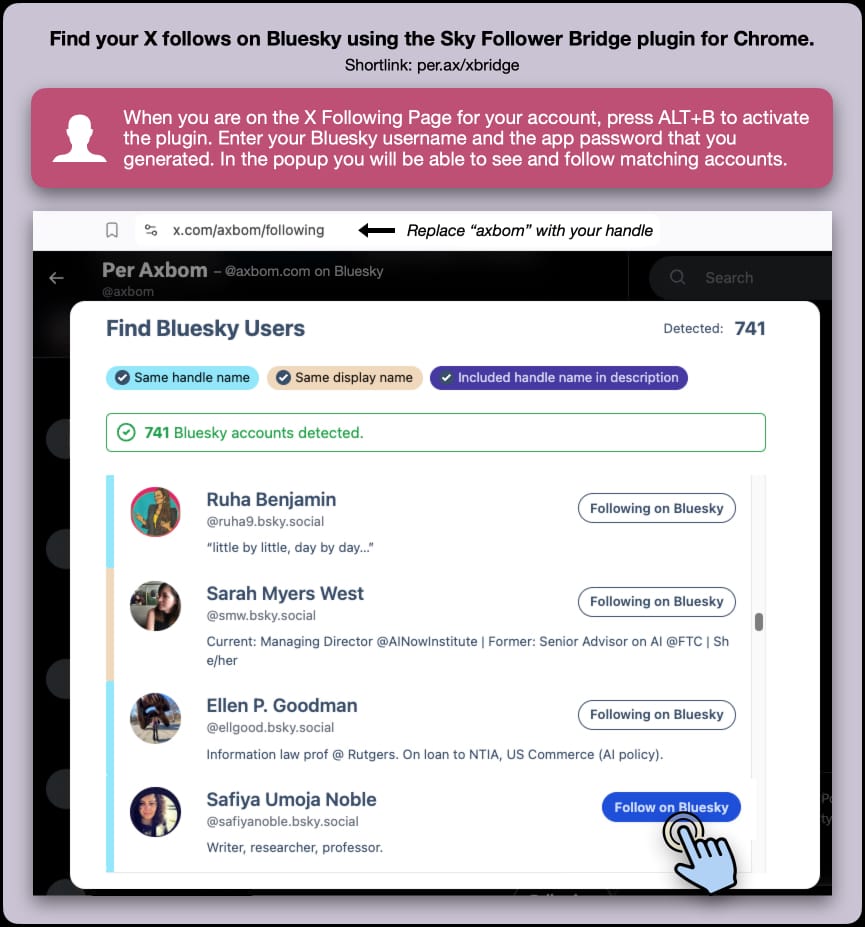
Find your X follows on Bluesky using the Sky Follower Bridge plugin for Chrome.

Shortlink: per.ax/xbridge

When you are on the X Following Page for your account, press ALT+B to activate the plugin. Enter your Bluesky username and the app password that you generated. In the popup you will be able to see and follow matching accounts.

Screenshot from the interface where the user is shown a list of matched accounts according to “same handle name”, “same display name” or “included handle in description”. Alongside each matched account on Bluesky it’s possible to follow an account by clicking a button, or see if you are already following them.

The url for the Following page is x.com/axbom/following where you can replace “axbom” with your own handle.

🔗 Originally posted on Bluesky

21 Oct 2024, 13:37
Share
LinkedIn Bluesky Email
  • Notes by Axbom
  • RSS

© 2026 Notes by Axbom